Installation
Deployment Pattern (VM-based standalone)
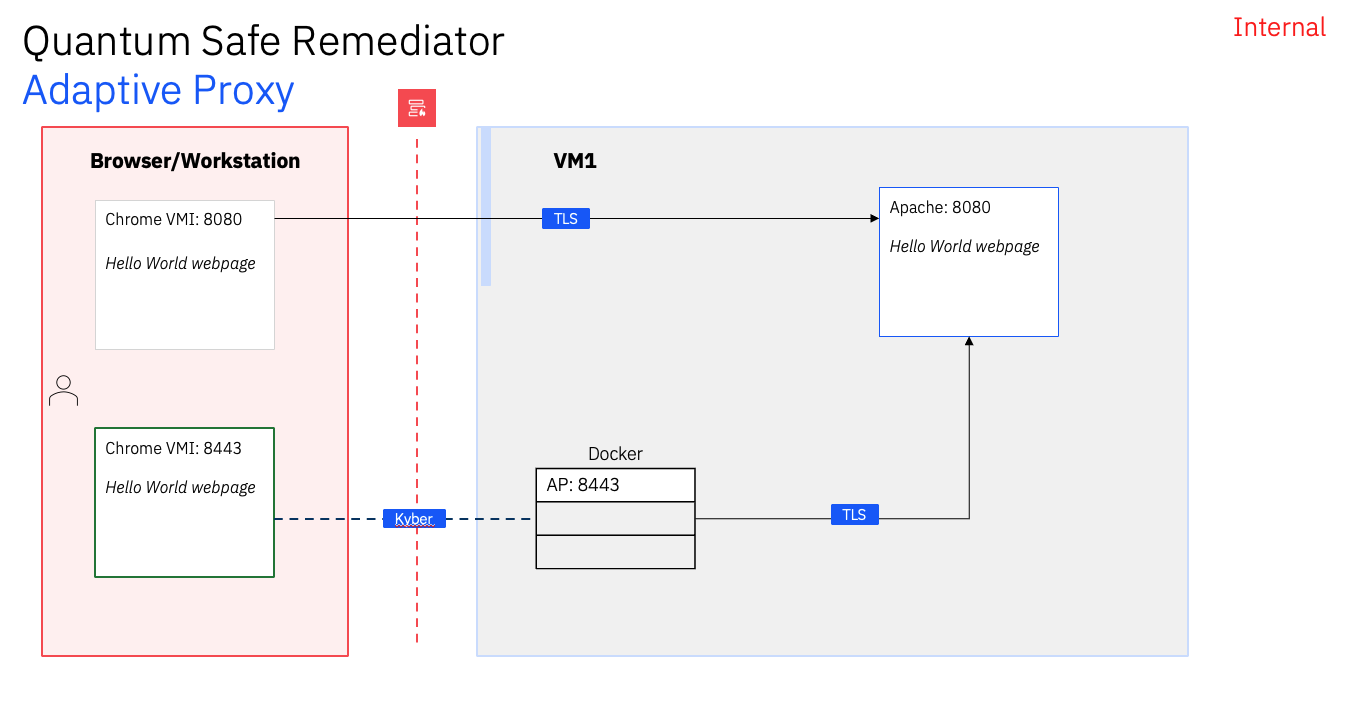
Starting with v1.0.1 there are 3 different deployment patterns; Standalone (VM), ingress controller (k8s), and post-ingress controller (k8s). This section is focused on the VM-based standalone deployment pattern.
Components
- Adaptive Proxy
- Performance test harness
Adaptive Proxy
The adaptive proxy requires a docker or podman host to run the container.
For our example, we’re going to set up the adaptive proxy to act as a loadbalancer for a kubernetes cluster.
Pre-Reqs
For Fedora, make sure the following packages are installed for cron.
sudo dnf -y install cronieInstalling Docker
On our gateway host we are running Fedora 40 Server:
sudo dnf remove docker \
                  docker-client \
                  docker-client-latest \
                  docker-common \
                  docker-latest \
                  docker-latest-logrotate \
                  docker-logrotate \
                  docker-selinux \
                  docker-engine-selinux \
                  docker-engine
Set up the repository
sudo dnf -y install dnf-plugins-core
sudo dnf config-manager --add-repo https://download.docker.com/linux/fedora/docker-ce.repo
Install Docker Engine, containerd, and Docker Compose
sudo dnf -y install docker-ce docker-ce-cli containerd.io docker-buildx-plugin docker-compose-pluginAdd your local user to the docker group
sudo usermod -G docker,wheel kramerroStart up docker
sudo systemctl start dockerInstalling jq
Install jq v1.7+
sudo dnf -y install jqInstalling Java
Install sdkman
curl -s "https://get.sdkman.io" | sudo bashLogin as root to source the environment
sudo su -Install Java 21 (as root)
sdk install java 21.0.2-openInstalling the proxy
Download the Adaptive Proxy from IBM Passport Advantage. If you are an IBM employee you can download internally here. Search for IBM Quantum Safe Remediator Adaptive Proxy.
Once downloaded, the file should be named IQSRAP_<version>_Linux_EN.zip
Extract to your gateway host
[kramerro@eksa-admin ~]$ unzip IQSRAP_<version>_Linux_EN.zip
Archive:  IQSRAP_<version>_Linux_EN.zip
  inflating: M0J90EN/adaptiveproxy_<version>.tar
Make the adaptive proxy directory in /opt and extract the tar file there
sudo tar xvf M0J90EN/adaptiveproxy_<version>.tar -C /opt/adaptive-proxyNow run the installer script
cd /opt/adaptive-proxy/workdir

sudo ./install.sh
Accept the license agreement and allow the installation to continue
For all the algorithms, just hit enter to accept the defaults.
After installation, verify that the certificates have been generated
ll certificates/ca

-rw-r--rw- 1 1012 1012  635 Jun 27 11:30 CA_default.crt
-rw-----w- 1 1012 1012  227 Jun 27 11:30 CA_default.key
-rw-r--rw- 1 1012 1012   41 Jun 27 11:30 CA_default.srl
-rw-r--rw- 1 1012 1012 5685 Jun 27 11:30 CA_hybrid.crt
-rw-----w- 1 1012 1012 5458 Jun 27 11:30 CA_hybrid.key
-rw-r--rw- 1 1012 1012   41 Jun 27 11:30 CA_hybrid.srl
-rw-r--rw- 1 1012 1012  631 Jun 27 11:30 CA_legacy.crt
-rw-----w- 1 1012 1012  227 Jun 27 11:30 CA_legacy.key
-rw-r--rw- 1 1012 1012   41 Jun 27 11:30 CA_legacy.srl
-rw-r--rw- 1 1012 1012 5502 Jun 27 11:30 CA_qsc.crt
-rw-----w- 1 1012 1012 5295 Jun 27 11:30 CA_qsc.key
-rw-r--rw- 1 1012 1012   41 Jun 27 11:30 CA_qsc.srl
-rw-r--rw- 1 1012 1012  114 Jun 27 11:30 server_default.crt
-rw-r--rw- 1 1012 1012  111 Jun 27 11:30 server_hybrid.crt
-rw-r--rw- 1 1012 1012  111 Jun 27 11:30 server_legacy.crt
-rw-r--rw- 1 1012 1012  102 Jun 27 11:30 server_qsc.crt

ll certificates/leaf
-rw-r--rw- 1 1012 1012  895 Jun 27 11:30 server_default.crt
-rw----rw- 1 1012 1012  227 Jun 27 11:30 server_default.key
-rw-r--rw- 1 1012 1012 5640 Jun 27 11:30 server_hybrid.crt
-rw----rw- 1 1012 1012 5458 Jun 27 11:30 server_hybrid.key
-rw-r--rw- 1 1012 1012  891 Jun 27 11:30 server_legacy.crt
-rw----rw- 1 1012 1012  227 Jun 27 11:30 server_legacy.key
-rw-r--rw- 1 1012 1012 5458 Jun 27 11:30 server_qsc.crt
-rw----rw- 1 1012 1012 5295 Jun 27 11:30 server_qsc.key
Finally verify the images are available
$ docker images
REPOSITORY                                                  TAG       IMAGE ID       CREATED         SIZE
de.icr.io/qs-remediator/adaptive-proxy-provider-ubi-micro   1.0.1     1f345e88fb04   2 weeks ago     530MB
de.icr.io/qs-remediator/qsc-openssl-provider                1.0.1     f3fe42d98d81   3 months ago    284MB
hello-world                                                 latest    d2c94e258dcb   17 months ago   13.3kB
The Adaptive Proxy supports two patterns of TLS handling:
- edge termination: In an edge scenario, Adaptive Proxy terminates the SSL connection from the client and initiates a new or no SSL connection to the backend/upstream servers.
- re-encrypt: In a re-encrypt scenario, Adaptive Proxy decrypts the client request, then encrypts it again when sending to the backend/upstream using the respective backend/upstream server certificate and keys as per the configuration provided.
We’ll check them both out and see which one works better for our use case.