GitHub Actions Integration
Purpose
Integration with GitHub Actions allows for flexible, automatic scanning of repository code. This allows for proactive protection and remediation, before vulnerable code ever gets distributed and used. This is highly recommended for any enterprise leveraging GitHub as a code repoository, especially if it houses production code.
Overview
This guide provides step-by-step instructions for integrating GitHub Actions with Quantum Safe Explorer.
It discusses primarily how to run scan Pull Requests (PRs) when opened, but can be adapted to any use case.
It covers:
- Creating the GitHub Action repository
- Creating the repository to be scanned
- Triggering the Scan
- Accessing the results
- Guidance on creating a template repository
- Troubleshooting and workarounds
Create Private GitHub Action repository
Structure:
qse-scan-action/
├── action.yml                    # Main action definition (at root!) - see below
├── README.md                     # starter README below
├── LICENSE
└── qse/                          # QSE CLI files
    ├── cli.sh
    ├── cli.ps1
    ├── configuration.prop
    ├── LicenseAcceptance.config  # TODO: Edit first line to =true, or the cli won't run on its own
    ├── version
    ├── vulnerability_severity.json
    ├── lib/
    │   └── *.jar files
    ├── la_home/
    ├── insights/
    └── swidtag/
Reveal code for action.yml
action.yml
name: "IBM Quantum Safe Explorer Scan"
description: "Runs the embedded IBM QSE CLI against a target folder"
author: "ibm-client-engineering" # TODO: replace with your org

inputs:
  input_dir:
    type: string
    description: "Folder to scan (usually the checked-out repo)"
    required: false
    default: ${{ github.workspace }}

  languages:
    type: string
    description: "Language list for QSE CLI"
    required: false
    default: ".java,.jar,.py,.cpp,.go,.cs,.dart"

  scan_type:
    type: choice
    description: "Type of scan(s) to run"
    required: false
    options:
      - "api_discovery"
      - "crypto_analysis"
      - "both"
    default: api_discovery

  java_class_path:
    type: string
    description: "Java class path for Cryptography Analysis"
    required: false
    default: "./java_files/"

  output_dir:
    type: string
    description: "Output folder for QSE scan results"
    required: false
    default: "qse-scan-results"

runs:
  using: "composite"
  steps:

    - name: Ensure CLI is executable
      run: |
        chmod +x "${GITHUB_ACTION_PATH}/qse/cli.sh"
      shell: bash

    - name: Cryptography Analysis Scan
      if: "${{ inputs.scan_type == 'crypto_analysis' || inputs.scan_type == 'both' }}"
      run: |
        cd "${GITHUB_ACTION_PATH}/qse"
        ./cli.sh \
          -i "${{ inputs.input_dir }}" \
          -l ".java" \
          -cf "${{ inputs.java_class_path }}" \
          -da \
          -o "${{ github.workspace }}/${{ inputs.output_dir }}"
      shell: bash

    - name: API Discovery Scan
      if: "${{ inputs.scan_type == 'api_discovery' || inputs.scan_type == 'both' }}"
      run: |
        cd "${GITHUB_ACTION_PATH}/qse"
        ./cli.sh \
          -i "${{ inputs.input_dir }}" \
          -l "${{ inputs.languages }}" \
          -o "${{ github.workspace }}/${{ inputs.output_dir }}"
      shell: bash

    - name: Upload QSE Scan Artifacts
      uses: actions/upload-artifact@v3 # at the time of writing this, v4+ is not supported for GHES
      with:
        name: qse-scan-results
        path: ${{ github.workspace }}/${{ inputs.output_dir }}
Reveal code for README.md
README.md
# IBM Quantum Safe Explorer Scan (GitHub Action)

Run the **IBM Quantum Safe Explorer (QSE)** CLI against a repository (or subfolder) during CI—most commonly on **Pull Requests**—to discover cryptographic usage, generate CBOM-like outputs, and surface potential modernization targets.

> **What this Action does:**
> - Executes the **embedded** IBM QSE CLI (bundled in this repo under `qse/`)
> - Scans your codebase for cryptographic usage across supported languages
> - Saves results as workflow artifacts for review
>
> **Why a shared Action?**
> - One centralized copy of the CLI for your org
> - Consistent, low-friction setup across many repos
> - Easy to update globally (tag a new version and bump the reference)

---

## Quick Start

1. **Reference this Action from a repository you want to scan.**
2. **Checkout** the repo’s code (so it’s on disk in the runner).
3. **Invoke the Action** with the directory to scan and language list.

This Action assumes the QSE CLI and its dependencies are **embedded** in this repository under `qse/` and are executable in a Linux GitHub runner.

---

## Usage Examples

### Scan entire repo on Pull Requests

```yaml
# .github/workflows/qse-scan.yml
name: QSE Scan on PRs

on:
  pull_request:

jobs:
  qse-scan:
    # TODO: repace with the name of the hardware you have available under Actions -> Runners
    runs-on: ubuntu-latest
    steps:
      # 1) Checkout the code to the runner's workspace
      - uses: actions/checkout@v4

      # 2) Set up JDK 17 (minimum)
      - name: Set up JDK 17
        uses: actions/setup-java@v4
        with:
          distribution: temurin
          java-version: '17'

      # 3) Run the action
      - name: Run Quantum Safe Explorer scan
        uses: your-org/qse-scan-action@v1
        with:
        # If you want to scan a specific folder, set it here; otherwise scan repo root
        # input_dir: ${{ github.workspace }}
        # Specify what scan(s) to run (api_discovery is the default):
        # scan_type: "crypto_analysis" | "api_discovery" | "both" # pick one
        # Optional: override default output folder (relative output paths are relative to the input folder):
        # output_dir: "qse-scan-results"
```

### Scan a subfolder (monorepo)

```yaml
- uses: actions/checkout@v4

- name: Set up JDK 17
  uses: actions/setup-java@v4
  with:
    distribution: temurin
    java-version: '17'

- name: QSE scan (only /services/payments)
  uses: ./.github/actions/qse-scan
  with:
    input_dir: ${{ github.workspace }}/services/payments # only scan this payments folder
    # Optionally constrain languages scope"
    # languages: ".java,.py"
    # Specify what scan(s) to run (api_discovery is the default):
    # scan_type: "crypto_analysis" | "api_discovery" | "both" # pick one
    # Optionally specify override default output directory (relative output paths are relative to the input folder):
    # output_dir: "qse_${{ matrix.repo }}_out"
```

### Scan multiple repos (matrix)

```yaml
name: Org-wide QSE Scan (matrix)

on:
  workflow_dispatch:

jobs:
  qse-matrix:
    # TODO: repace with the name of the hardware you have available under Actions -> Runners
    runs-on: ubuntu-latest

    strategy:
      fail-fast: false
      matrix:
        repo: [
          "your-org/service-a",
          "your-org/service-b",
          "your-org/service-c"
        ]

    steps:
      - name: Checkout target repo
        uses: actions/checkout@v4
        with:
          repository: ${{ matrix.repo }}
          path: target
          token: ${{ secrets.ORG_READONLY_PAT }}

      - name: Set up JDK 17
        uses: actions/setup-java@v4
        with:
          distribution: temurin
          java-version: '17'

      - name: Run QSE scan (local action)
        uses: ./.github/actions/qse-scan
        with:
          # Optionally constrain scan to a subfolder
          # input_dir: ${{ github.workspace }}/target
          # Optionally constrain languages scope-
          # languages: ".java,.py"
          # Specify what scan(s) to run (api_discovery is the default):
          # scan_type: "crypto_analysis" | "api_discovery" | "both" # pick one
          # Optionally specify override default output directory (relative output paths are relative to the input folder):
          # output_dir: "qse_${{ matrix.repo }}_out"
```

---

## Inputs

| Name         | Required | Default                   | Description |
|--------------|----------|---------------------------|-------------|
| `input_dir`  | No       | `${{ github.workspace }}` | Directory to scan. Usually the checked-out repository or a subfolder. |
| `languages`  | No       | `{.java,.jar,.py,.cpp,.go,.cs,.dart}`             | In brackets, comma-separated, no spaces. |
| `output_dir` | No       | `qse-scan-results`        | Where scan results are written. |

---

## Artifacts

- **Name:** `qse-scan-results` (or your custom `output_dir`)
- **Contents:** Whatever the QSE CLI produces (e.g., reports, logs, CBOM-like files)
- **Access:** Available in the workflow run’s “Artifacts” section for download and review

Example gating step:

```yaml
- name: Fail on high severity (example)
  run: |
    if grep -Riq 'severity.*HIGH' qse-scan-results; then
      echo "::error::High-severity cryptographic findings detected."
      exit 1
    fi
```

---

## Permissions

- For scanning the current repo on PRs, the default `GITHUB_TOKEN` is enough.
- To scan other private repos from a central workflow, use a read-only PAT with `contents:read`.

---

## Performance & Runners

- Works on GitHub-hosted runners.
- For heavier scans, consider self-hosted runners.

---

## Troubleshooting

**CLI not found:** Ensure the `qse/` folder (with `cli.sh`) exists.

**Empty results:** Verify `input_dir` points to the correct path.

**Forked PRs:** Secrets are not passed to forked PRs; consider branch-based scans.

---

## Development (maintainers)

The Action is a composite action. Modify `action.yml` to extend CLI flags or support new languages.

---

## Versioning

Tag releases (`v1`, `v1.1.0`) and use them in consumer repos:

```yaml
uses: your-org/qse-scan-action@v1
```

---

## Security & Licensing

- Ensure licensing/EULA requirements for IBM QSE CLI are followed.
- Store any secrets outside this repo.

---

## Support

Open an issue in this repo or contact the platform/security team.
Commit & Push
git add .
git commit -m "Initial commit of QSE scan action with embedded CLI"
git push
Tag & Push
git tag v1
git push origin v1
Settings
- In the repository, configure the following under Settings -> Actions -> General ->
- Actions permissions to one of:
- Allow local actions only
- Allow select actions
- Allow all actions = Workflow permissions
- Read and write permissions
- Access to one of:
- Accessible from repositories in the organization
- Accelsible from repositories in the enterprise
- Actions permissions to one of:
- Ensure you have all required permissions from your organization/enterprise
Release (Optional)
- Go to your Action repo on GitHub
- Click Releases > Draft new release
- Select the tag (v1)
- Publish
Create Repository to Scan
Structure:
my-project/
├── src/
├── README.md
└── .github/
    └── workflows/
└── qse-scan.yml # Workflow that uses the action, see belowFor use with the sample_files repository, make sure you set the input directory to the following in qse-scan.yml:
with:
  input_dir: ${{ github.workspace }}/sample_files
This is included in a comment in the below example file.
Reveal code for qse-scan.yml
.github/workflows/qse-scan.yml
name: QSE Scan on PRs

on:
  pull_request:

jobs:
  qse-scan:
    runs-on: ubuntu-latest # TODO: Edit this to match your available hardware name exactly (check Settings -> Actions -> Runners)

    steps:
      # 1) Checkout the code to the runner's workspace
      - uses: actions/checkout@v4

      - name: Set up JDK 17
        uses: actions/setup-java@v4
        with:
          distribution: temurin
          java-version: '17'

      # 2) Call your reusable Action (tag the version you created, e.g., v1)
      - name: Run QSE Scan
        uses: your-org/qse-scan-action@v1 # TODO: replace with your org
        with:
          # If you want to scan a specific folder, set it here; otherwise scan repo root
          # input_dir: ${{ github.workspace }}/sample_files # Use this for the sample_files repo
          # Match your local CLI usage
          # Specify what scan(s) to run (api_discovery is the default):
          # scan_type: "crypto_analysis" | "api_discovery" | "both" # pick one
          # Optional: override default output folder (relative output paths are relative to the input folder):
          # output_dir: "./qse-scan-results"
Reference the README file above for other examples of workflow files
Settings
Configure similar settings for this respository so it can be scanned:
- Under Settings -> Actions -> General ->
- Actions permissions to one of:
- Allow local actions only
- Allow select actions
- Allow all actions
- Workflow permissions
- Read and write permissions
- Actions permissions to one of:
Commit & Push
git add .
git commit -m "Initial commit of repo to be scanned by QSE"
git push
Trigger the Scan
Perform the action that triggers your scan, based on your workflow yaml file
In the above example, you would have to open a Pull Request to trigger the scan:
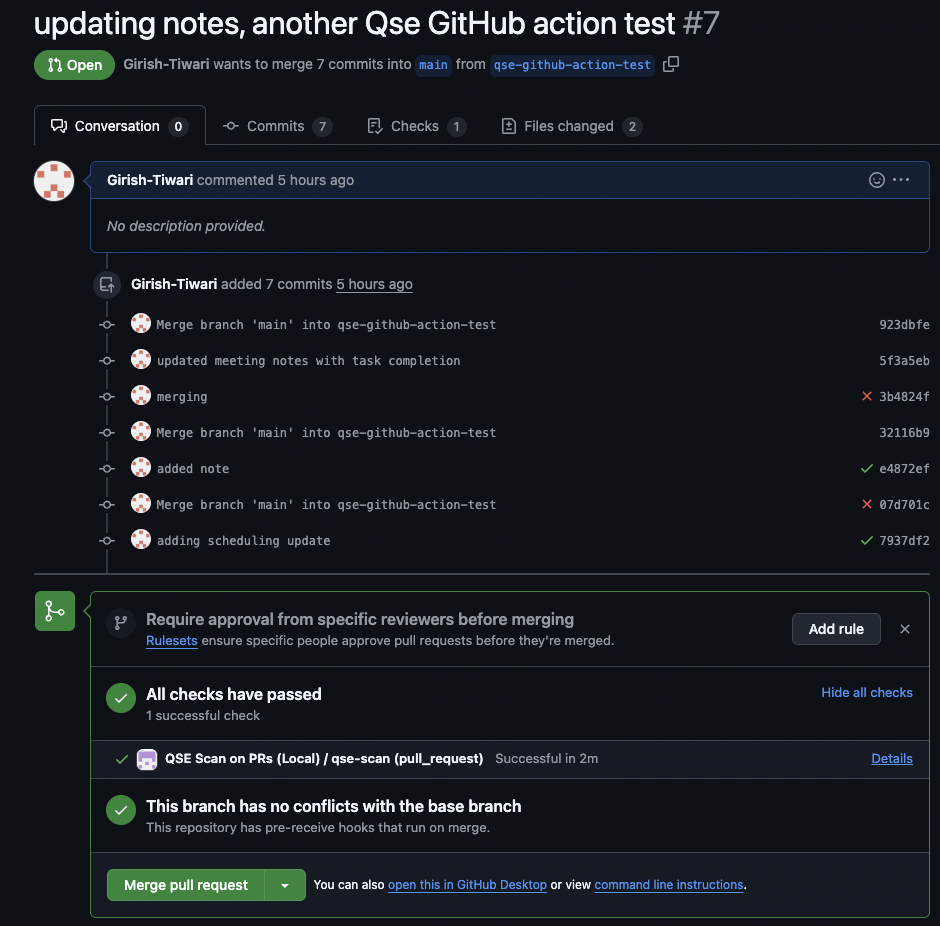
When you click into the Details, you will be able to see any issues and the runtime.
If successful, there will be an Artifacts section below with the scan resuts .zip file like so:
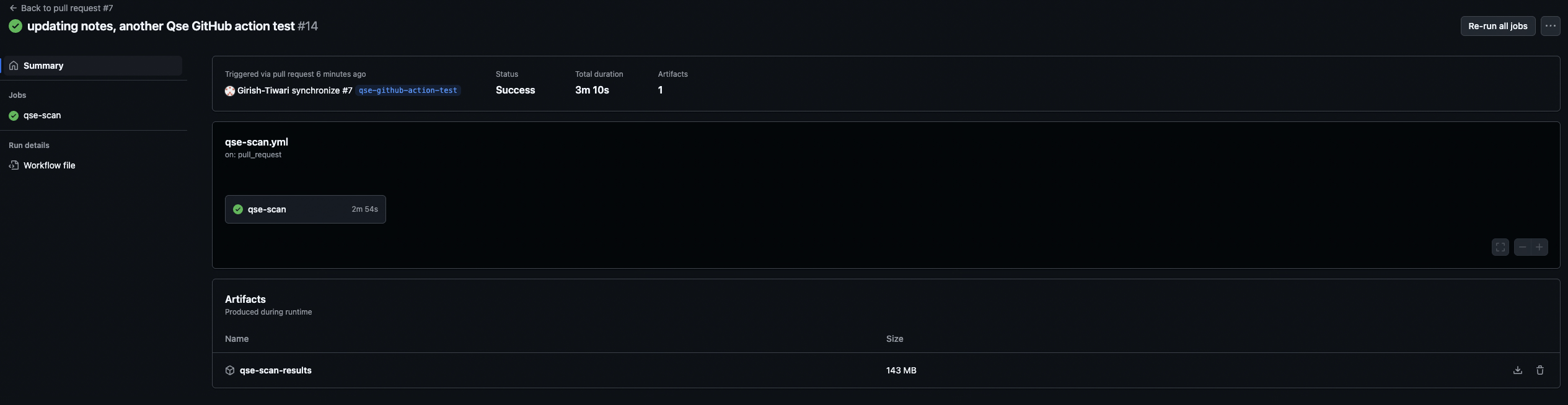
Download the file by clicking the download icon on the right of the tile section with the filename. Follow the instructions here to view the results.
Template Repository
If you want to reuse this scan for many repositories, it is recommended to create a template that includes this “to be scanned repository” structure (shown again below) for reusability:
my-project/
├── src/
├── README.md
└── .github/
    └── workflows/
        └── qse-scan.yml          # Workflow that uses the action
Direct updates to Portfolio View
There are two methods to enable direct updates from Github Actions to the Portfolio View dashboard. Both require some amount of custom scripting, some of which (for method 1) is done below.
Method 1: Send scan results to Loading Zone
The first step to enabling this is to follow the recommended fixes for the upload-artifact issue, which sends the scan results from the Github Action directly to the machine which hosts the Portfolio View dashboard.
Ensure that the host, port, and credentials added to the Repository secrets as mentioned in that section match that of the machine which hosts the Portfolio View dashboard.
Next, you will need to set up a script that runs either at a desired time interval, or when the /desired/path/on/remote/machine (where the scan results get sent) is updated. The script will need to:
Insert, into the files which will be loaded, the appropriate
ApplicationIdandRepositoryId.Copy the files to the appropriate locations:
- If running API Discovery or both
/desired/path/on/remote/machine/qse-scan-results/qs_explorer_result/quantum_safe_api_discovery_crypto_inventory.json -> IBM_QSE_2.2.3_PortfolioView/.../workidr/apm-dataloader/flat-input- If running Cryptography Analysis or both
/desired/path/on/remote/machine/qse-scan-results/qs_explorer_result/quantum_safe_cryptography_analysis_findings_java.json -> IBM_QSE_2.2.3_PortfolioView/.../workidr/apm-dataloader/input- Run
npm startin the apm-dataloader directory to load the data.
See the instructions on data loading for more details on the Portfolio View data ingestion process.
Method 2: Directly load scan results
This method involves running the data loading script from within the Github Action itself. You will need to follow similar steps, namely:
Insert, into the files which will be loaded, the appropriate
ApplicationIdandRepositoryId.Adapt the data loading script to run in Github Actions
Set up its config to point to:
quantum_safe_api_discovery_crypto_inventory.json # To be processed as a flat inputand
quantum_safe_cryptography_analysis_findings_java.json # To be processed as a regular inputTroubleshooting
Action is not permitted by company policy
upload-artifact and/or downloads
If you are blocked from using the upload-artifact Github Action or you are unable to download files (i.e. ephemeral environment), then you can directly transfer the results to a different machine.
In order to do so, follow these steps:
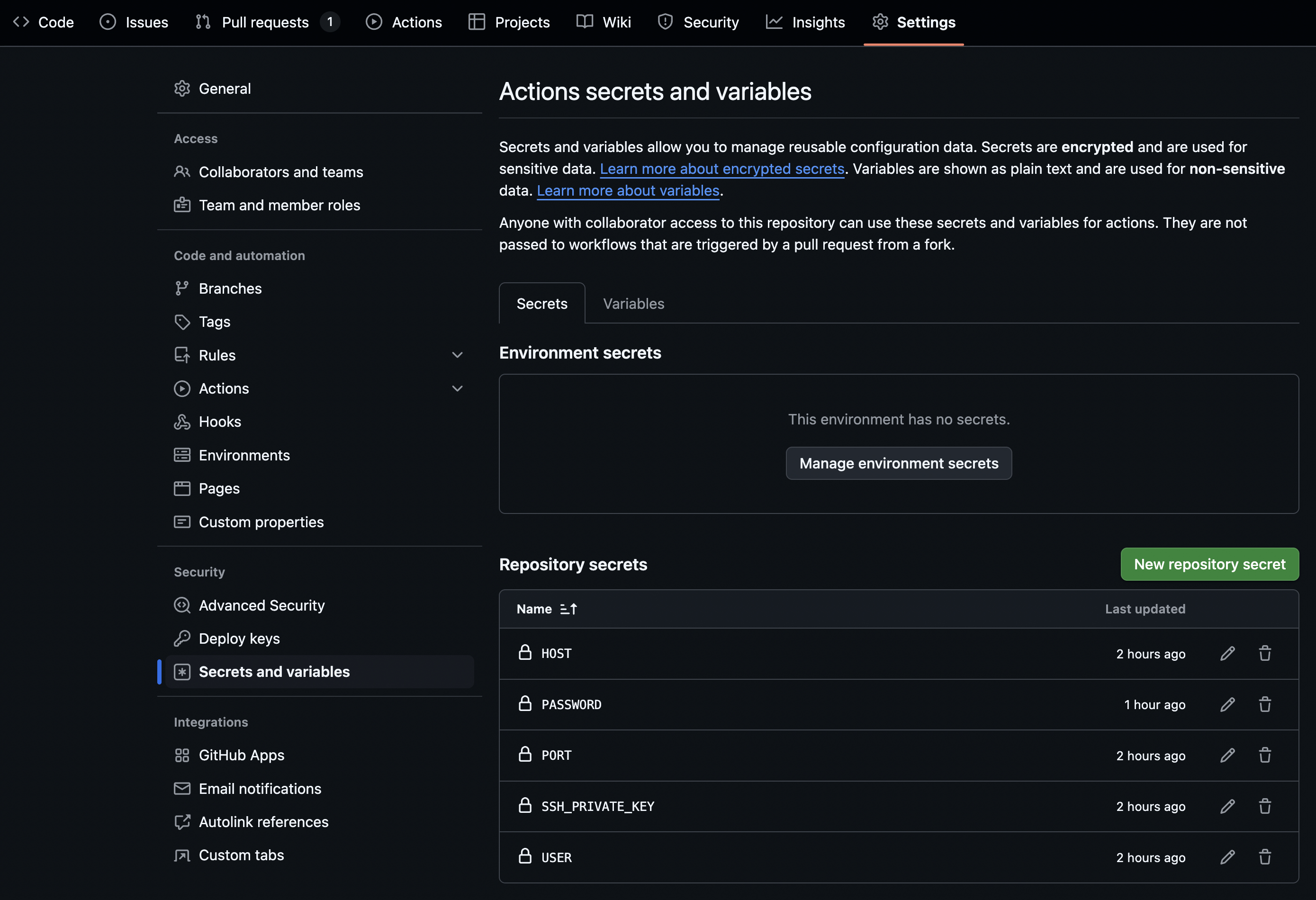
- In your action repo, add the following secrets by navigating to Settings->Secrets and variables and clicking on New repository secret:
- HOST
- PORT
- USER
- SSH_PRIVATE_KEY (if applicable)
- PASSWORD (if applicable)
This is how it will look like with all of the above added in:
- Remove the upload-artifact section from your action.yml
- In
action.yml(orqse-action.yml, if you only want this to be used in a single repository), add the following based on what you require to access the remote machine which will hold the results:
- For accessing via an identity file (key):
    - name: Copy files via SCP
      run: |
        mkdir -p /tmp/
        touch /tmp/key.pem
        echo "${{ secrets.SSH_PRIVATE_KEY }}" > /tmp/key.pem
        chmod 600 /tmp/key.pem
scp -i /tmp/key.pem -P ${{ secrets.PORT }} -r ${{ github.workspace }}/${{ inputs.output_dir }}qse-scan-results ${{ secrets.USER }}@${{ secrets.HOST }}:/desired/path/on/remote/machine - For accessing via password:
    - name: Copy files via SSHPASS
      run: |
        sshpass -p "${{ secrets.PASSWORD }}" scp -P ${{ secrets.PORT }} -r ${{ github.workspace }}/${{ inputs.output_dir }}qse-scan-results ${{ secrets.USER }}@${{ secrets.HOST }}:/desired/path/on/remote/machine
Once the action runs, you will be able to access the results from the /desired/path/on/remote/machine/qse-scan-results on your remote machine.
qse-scan-action
If the qse-scan-action is not allowed by your company or organization’s policy, you can still test it out (see details below)
For widespread use, it’s recommended to pursue getting permission to allow this action, as it is:
- Reusable and flexible
- Can be triggered in a variety of ways as appropriate for each situation
- Ensures scan version consistency
- Only one version of QSE exists
- Much more efficient and organized
- Small amount of static storage requried
- Easy to manage (update, delete, modify)
- Scalable and adaptable
- If you do customize the CLI, then you only need to store one verison of each customization per use case therefore, the alternative should only be used for testing purposes
Instead of creating two separate repositories, one to host the action and one with the source code to be scanned, this alternative places the contents of the action into the same repository beings scanned like so:
MC-QSE/
├── README.md
├── src/                                   # Your application code
│   └── (your project files)
│
├── .github/
│   ├── actions/                           # LOCAL ACTION
│   │   └── qse-scan/
│   │       ├── action.yml                 # Action definition
│   │       └── qse/                       # QSE CLI
│   │           ├── cli.sh
│   │           ├── lib/*.jar
│   │           └── (other QSE files)
│   │
│   └── workflows/                         # CONSUMER WORKFLOW
│ └── qse-scan.yml # Uses: ./.github/actions/qse-scanFor use with the sample_files repository, make sure you set the input directory to the following in qse-scan.yml:
with:
  input_dir: ${{ github.workspace }}/sample_files
This is included in a comment in the below example file.
The new qse-scan.yml becomes:
Reveal code for modified qse-scan.yml
.github/workflows/qse-scan.yml
name: QSE Scan on PRs

on:
  pull_request:

jobs:
  qse-scan:
    # TODO: repace with the name of the hardware you have available under Actions -> Runners
    runs-on: ubuntu-latest
    steps:
      # 1) Checkout the code to the runner's workspace
      - uses: actions/checkout@v4

      # 2) Set up JDK 17 (minimum)
      - name: Set up JDK 17
        uses: actions/setup-java@v4
        with:
          distribution: temurin
          java-version: '17'

      # 3) Run the action
      - name: Run QSE Scan (Local)
        uses: ./.github/actions/qse-scan ### Accesses a local action yaml instead of the separate GitHub Action
        with:
        # If you want to scan a specific folder, set it here; otherwise scan repo root
        # input_dir: ${{ github.workspace }}/sample_files # Use this for the sample_files repo
        # Specify what scan(s) to run (api_discovery is the default):
        # scan_type: "crypto_analysis" | "api_discovery" | "both" # pick one
        # Optional: override default output folder (relative paths are relative to the input folder):
        # output_dir: "./qse-scan-results"
The whole .github/actions folder is moved into the same repository that you are scanning.
Template modification
For reuse with this method, create a template with the above structure, that includes the cli, instead.
Unrecognized Java Runtime version
If you see something such as the the following output from the qse-scan:
Error: 3-10 14:50:08,590] [2-thread-2] [ERROR] [com.ibm.quantumsafe.sca.framework.common.JavaGenerateGraphModelImpl] - Failed to create a graph for /home/runner/_work/sample_files/java_files/VulnerableCryptoExample.java
java.lang.UnsupportedClassVersionError: VulnerableCryptoExample has been compiled by a more recent version of the Java Runtime (class file version 65.0), this version of the Java Runtime only recognizes class file versions up to 61.0
Then you will need to recompile the java file with:
javac --release 17 VulnerableCryptoExample.java # replace with the name of your java fileAnd then rerun the action.